Contents
2. Procedure and control description
The storage collects the incoming products and releases them again at the parameterized speed.
2. Procedure and control description
The storage element can be used as a universal product and material storage in the material flow.
It collects incoming products or objects if the output of the element is blocked, e.g. due to faults or other interruptions in the downstream material flow.
The storage releases the stored objects again at a defined release speed as soon as the output of the element is no longer blocked, i.e. the interruption in the material flow has ended.
At the same time, the storage can also be used as a feed storage (e.g. for blanks) for packaging machines (case packers). In its function, the storage is a type of universal storage (mass storage).
Incoming product is immediately returned to the outfeed if the material flow is undisturbed (no storage). Gaps in the product flow are thus closed in the storage by catching up.
Typical storages for this purpose are
•Buffer tables (bottles)
•Bulk storage/bunker (lid)
•silos
•tanks
•Magazines (blanks)
For the storage, the maximum capacity (content), an initial allocation (initial content with which the storage is filled at the start of each simulation run), the output speed (max. output, describes the throttle function) and a failure behaviour (availability and MTTR) can be parameterized. In the default setting, the failure behavior is deactivated.
The initial content is always on the discharge side. Therefore, this product quantity is discharged at the start of the simulation if the maximum discharge is greater than or equal to the initial content.
Figure 2 shows a simple Storage
|
Simple storage in the upstream with a defined maximum capacity |
|
Simple storage in the downstream with a defined maximum capacity |


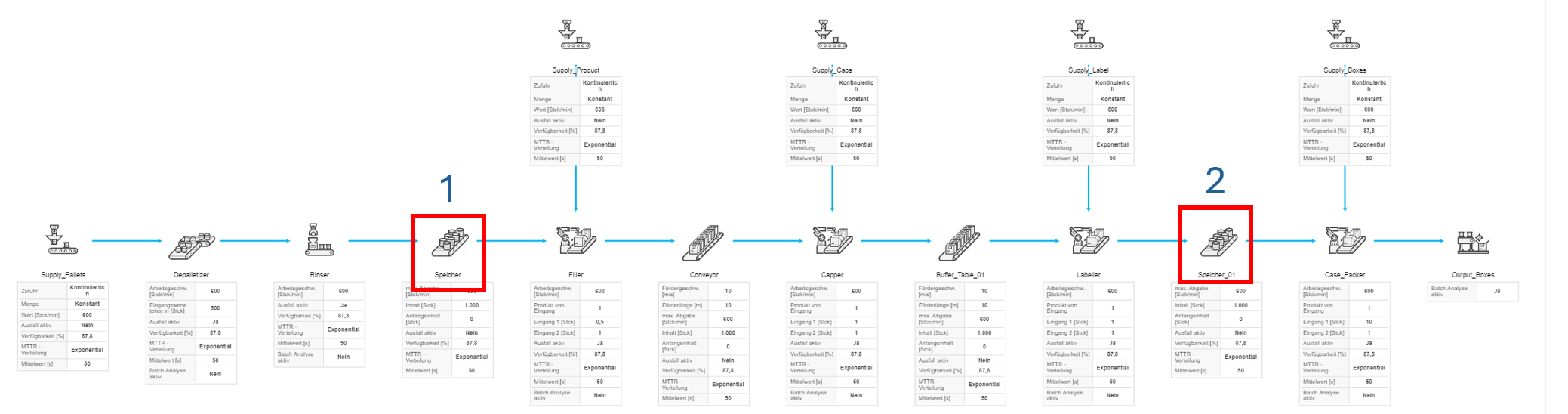
Figure 2 - Simple storage
Figure 2 - Storage |
|

© SimPlan AG - Hanau District Court, Commercial Register (Part B) 6845 - info@simplan.de - www.simplan.de/en